
The Problem
Every working day ends the same way for a landscaper. Hot, tired, done. All you want is to crack a beer or take your kid fishing.
Instead, there's paperwork. The day's job sheet, scribbled on a clipboard between yards, has to get typed into the customer database. Which yards got done. Which ones got skipped. What extra work the crew picked up along the way. For this owner, that was about two more hours at a keyboard, every night, after ten hours in the sun.
The work a computer honestly does better, sitting between a man and his evening.
Why this was hard
A day's job sheet is not clean data. It is the messiest input a business produces.
- It's handwritten. Different crew members, different handwriting, notes crammed in margins, sometimes printed, sometimes not.
- It's bilingual. Part of the crew writes in Spanish. The database is in English. A person had to translate as they typed.
- It takes judgment. "Cut the hedges, pulled some weeds" is an upsell that needs invoicing. "Sprinklers were running, mower would leave ruts" is a skipped yard that needs rescheduling. The typing was never the hard part. Knowing what each note means was.
Off-the-shelf form scanners choke on this. They read characters. They don't read situations. This is exactly what a language model is good at: read, understand, write.
What we built
Photo-to-database job logging
At the end of the day, the owner takes one photo of the job sheet.
The AI reads it, handwriting, Spanish and English, margin notes and all. Then it makes the calls a person used to make at the keyboard:
- Completed yards get logged against the right customer
- Upsells like hedge trimming or weeding get flagged for invoicing
- Skipped yards, sprinklers running, gate locked, get marked for rescheduling
- Anything it can't confidently read gets flagged for a human look
Then it updates the customer database, the same one he was typing into by hand.
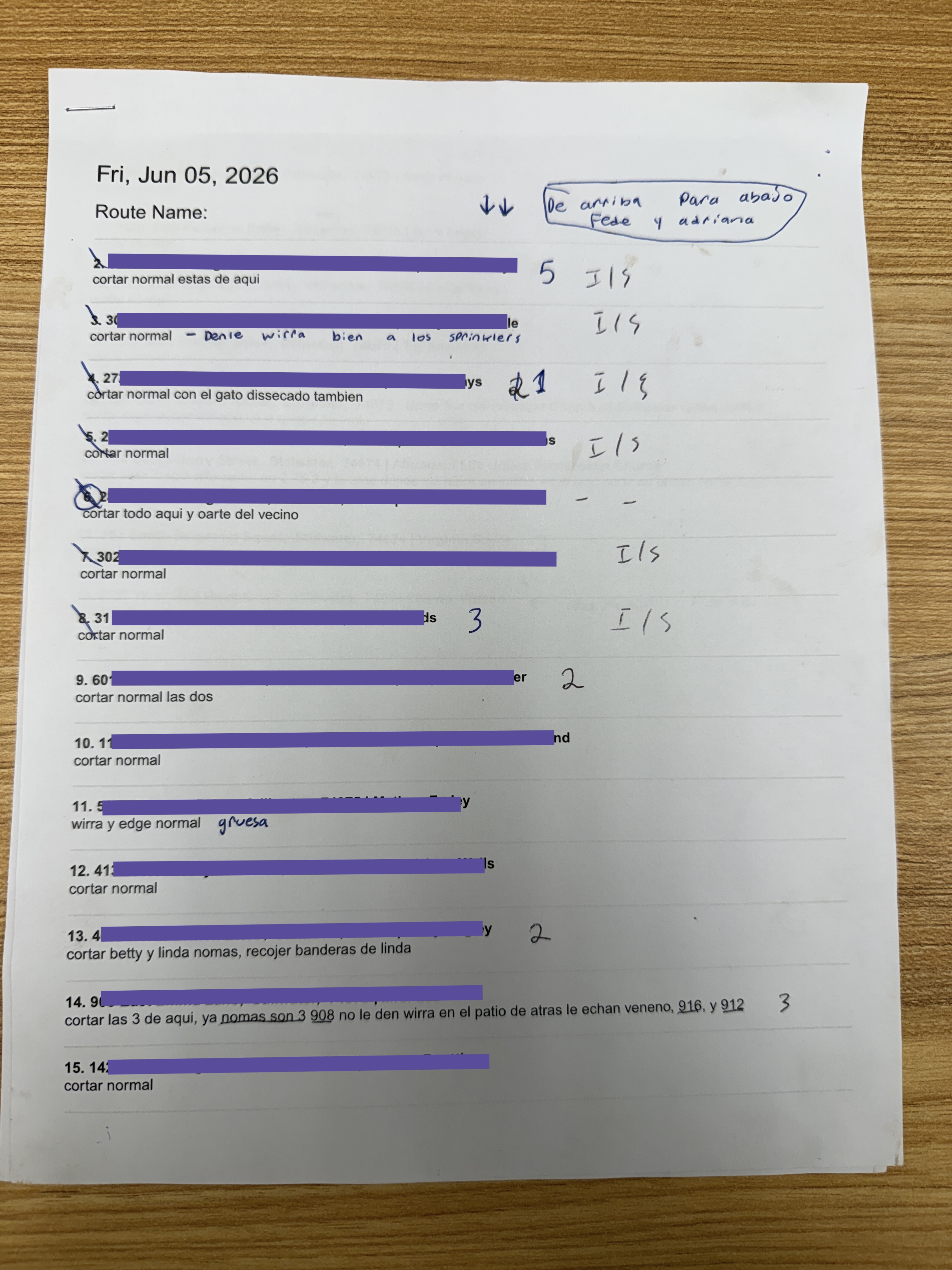
A real day's route sheet (details redacted). This is what the AI reads.
The nightly typing session is gone. The data is better than it was.
The job sheet was always the bottleneck. Not because typing is hard, but because it lands at the worst possible hour, when the person doing it has nothing left. Moving that job to an AI doesn't just save time. It moves the work to something that never gets tired at 7 PM.
What changed for the owner
We asked what he does with the time now.
He's out on the lake with his kid.
That's the whole point of this work. Take the tedious stuff a computer genuinely does better now, and let people be a little more human.
This client asked to stay anonymous, which we respect. The route sheet above is his real paperwork, with the details redacted. If you want to talk to a named client about what working with us is like, Anna will tell you.
Tech Stack
- Claude
- phone camera
- customer database
Got your own version of the clipboard?
Curious what it costs? Learn about the service →